


CI/CD-Mastery Serie | Teil 10 von 12
Von Code Sentinel, Technical Project Manager bei Java Fleet Systems Consulting
🗺️ Wo du in der Serie stehst
| Modul | Teile | Status |
|---|---|---|
| Modul 1: Foundations | Teil 1-4 | ✅ Abgeschlossen |
| Modul 2: Docker & Container | Teil 5-7 | ✅ Abgeschlossen |
| Modul 3: Deployment-Strategien | Teil 8-10 | 🔄 Du bist hier! |
| Modul 4: Enterprise & Advanced | Teil 11-12 | 📅 Coming Soon |
Level: 🟡 PROFESSIONALS | Lesezeit: ~15 Minuten | Voraussetzungen: Teil 1-9
📚 Was du bisher gelernt hast
In den letzten Wochen hast du:
- ✅ Pipelines gebaut (Teil 1)
- ✅ Security Gates implementiert (Teil 2-4)
- ✅ Container optimiert und abgesichert (Teil 5-7)
- ✅ Blue-Green Deployments gemeistert (Teil 8)
- ✅ Canary Releases mit Kubernetes aufgesetzt (Teil 9)
Heute: Wir machen Git zur Single Source of Truth für deine gesamte Infrastruktur.
⚡ 30-Sekunden-Überblick
Was du heute lernst:
- 🌱 Einsteiger: Was GitOps ist und warum es dein Leben einfacher macht
- 🌿 Erfahrene: ArgoCD Setup und praktische Workflows
- 🌳 Profis: Multi-Environment Management und Drift Detection
Nach diesem Teil kannst du:
- ✅ GitOps-Prinzipien verstehen und anwenden
- ✅ ArgoCD in deinem Cluster einrichten
- ✅ Environments sauber trennen (dev/staging/prod)
- ✅ Config-Drift automatisch erkennen und korrigieren
👋 Code Sentinel: „Git als Wahrheit – nicht als Hoffnung“
Hey! 👋
Code Sentinel hier. Schön, dass du wieder da bist!
Letzte Woche haben wir Canary Releases mit Kubernetes aufgesetzt. Du kannst jetzt Traffic schrittweise umleiten und bei Problemen automatisch zurückrollen. Solide Basis.
Aber ich hab eine Frage an dich: Weißt du gerade, was WIRKLICH in deinem Cluster läuft?
Nicht was laufen SOLLTE. Was TATSÄCHLICH deployed ist.
Sarah aus Hamburg schrieb mir letzte Woche:
„Code, wir hatten einen Incident. Jemand hat per kubectl einen Hotfix direkt im Cluster gemacht. Drei Wochen später wusste niemand mehr, dass das passiert ist. Deployment aus Git hat den Fix überschrieben. Production down.“
Das ist kein Edge Case. Das ist Alltag.
Das Problem: Deine Pipeline deployed aus Git. Aber zwischen den Deployments passieren Dinge:
- Manuelle kubectl-Änderungen („nur kurz fixen“)
- Secrets, die jemand direkt anlegt
- ConfigMaps, die „temporär“ angepasst werden
Nach drei Wochen: Git sagt A, Cluster hat B. Niemand weiß warum.
GitOps löst das. Nicht durch Hoffnung, sondern durch Automatisierung.
Lass uns das zusammen angehen! 🚀
🟢 GRUNDLAGEN
Was ist GitOps?
GitOps in einem Satz: Git ist die einzige Wahrheit. Der Cluster synchronisiert sich automatisch mit Git – nicht umgekehrt.
Das Prinzip:
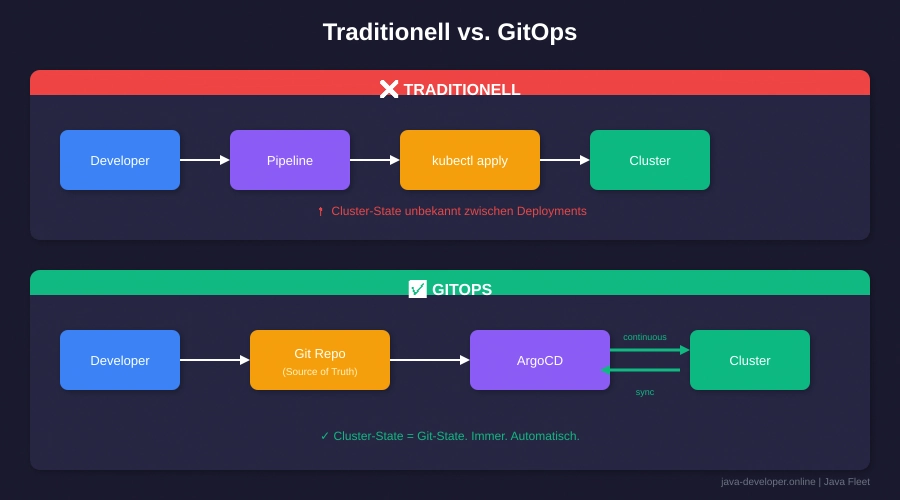

Abbildung 1: Der fundamentale Unterschied zwischen traditionellem Deployment und GitOps
Die vier GitOps-Prinzipien:
- Declarative: Alles als YAML/Code definiert
- Versioned: Alles in Git versioniert
- Automated: Änderungen werden automatisch angewendet
- Continuously Reconciled: Agent prüft und korrigiert Drift
💡 Neu bei GitOps? Stell dir vor, du hast einen Roboter, der alle 3 Minuten prüft: „Stimmt der Cluster noch mit Git überein?“ Wenn nicht, korrigiert er automatisch. Das ist GitOps.
Warum GitOps statt kubectl?
Das kubectl-Problem:
# Montag: Du deployest
kubectl apply -f deployment.yaml

# Mittwoch: Kollege "fixt" was
kubectl set image deployment/app app=myapp:hotfix

# Freitag: Du deployest wieder
kubectl apply -f deployment.yaml
# Hotfix ist weg. Keiner weiß warum.
Mit GitOps:
# Jede Änderung geht durch Git
git commit -m "Hotfix: Update image to myapp:hotfix"
git push

# ArgoCD deployed automatisch
# Und: Der Hotfix ist dokumentiert, reviewed, versioniert
Die Vorteile:
| Aspekt | Ohne GitOps | Mit GitOps |
|---|---|---|
| Audit Trail | kubectl history (lokal) | Git History (permanent) |
| Rollback | kubectl rollout undo (hoffentlich) | git revert (garantiert) |
| Review | „Vertrau mir“ | Pull Request |
| Drift Detection | Manuell | Automatisch |
| Disaster Recovery | 😰 | git clone + sync |
🟡 PROFESSIONALS
ArgoCD Setup
ArgoCD ist der De-facto-Standard für GitOps. Lass uns das aufsetzen.
Installation:
# Namespace erstellen
kubectl create namespace argocd

# ArgoCD installieren
kubectl apply -n argocd -f https://raw.githubusercontent.com/argoproj/argo-cd/stable/manifests/install.yaml

# Warten bis alles läuft
kubectl wait --for=condition=available deployment/argocd-server -n argocd --timeout=300s

# Admin-Passwort holen
kubectl -n argocd get secret argocd-initial-admin-secret -o jsonpath="{.data.password}" | base64 -d
CLI installieren:
# macOS
brew install argocd

# Linux
curl -sSL -o argocd https://github.com/argoproj/argo-cd/releases/latest/download/argocd-linux-amd64
chmod +x argocd
sudo mv argocd /usr/local/bin/
Login:
# Port-Forward für lokalen Zugriff
kubectl port-forward svc/argocd-server -n argocd 8080:443 &

# Login (admin + Passwort von oben)
argocd login localhost:8080
Repository-Struktur für GitOps
Empfohlene Struktur:
gitops-repo/
├── apps/                    # Application Definitions
│   ├── my-java-app/
│   │   ├── base/           # Basis-Konfiguration
│   │   │   ├── deployment.yaml
│   │   │   ├── service.yaml
│   │   │   └── kustomization.yaml
│   │   └── overlays/       # Environment-spezifisch
│   │       ├── dev/
│   │       │   └── kustomization.yaml
│   │       ├── staging/
│   │       │   └── kustomization.yaml
│   │       └── prod/
│   │           └── kustomization.yaml
│   └── another-app/
│       └── ...
├── infrastructure/          # Cluster-weite Ressourcen
│   ├── namespaces.yaml
│   ├── network-policies.yaml
│   └── resource-quotas.yaml
└── argocd/                  # ArgoCD Application Manifests
    ├── my-java-app-dev.yaml
    ├── my-java-app-staging.yaml
    └── my-java-app-prod.yaml
Warum diese Struktur?
- apps/: Jede App hat ihre eigene Konfiguration
- base/: Gemeinsame Basis für alle Environments
- overlays/: Environment-spezifische Anpassungen (Replicas, Ressourcen, etc.)
- infrastructure/: Cluster-weite Konfigurationen
- argocd/: ArgoCD Application Definitions
Erste Application anlegen
Base Deployment (apps/my-java-app/base/deployment.yaml):
apiVersion: apps/v1
kind: Deployment
metadata:
  name: my-java-app
spec:
  replicas: 1
  selector:
    matchLabels:
      app: my-java-app
  template:
    metadata:
      labels:
        app: my-java-app
    spec:
      containers:
      - name: app
        image: myregistry/my-java-app:latest
        ports:
        - containerPort: 8080
        resources:
          requests:
            memory: "256Mi"
            cpu: "100m"
          limits:
            memory: "512Mi"
            cpu: "500m"
        livenessProbe:
          httpGet:
            path: /actuator/health/liveness
            port: 8080
          initialDelaySeconds: 30
        readinessProbe:
          httpGet:
            path: /actuator/health/readiness
            port: 8080
          initialDelaySeconds: 10
Base Kustomization (apps/my-java-app/base/kustomization.yaml):
apiVersion: kustomize.config.k8s.io/v1beta1
kind: Kustomization

resources:
  - deployment.yaml
  - service.yaml
Production Overlay (apps/my-java-app/overlays/prod/kustomization.yaml):
apiVersion: kustomize.config.k8s.io/v1beta1
kind: Kustomization

namespace: production

resources:
  - ../../base

# Production-spezifische Anpassungen
replicas:
  - name: my-java-app
    count: 3

images:
  - name: myregistry/my-java-app
    newTag: v1.2.3  # Feste Version in Prod!

patches:
  - patch: |-
      - op: replace
        path: /spec/template/spec/containers/0/resources/requests/memory
        value: "512Mi"
      - op: replace
        path: /spec/template/spec/containers/0/resources/limits/memory
        value: "1Gi"
    target:
      kind: Deployment
      name: my-java-app
ArgoCD Application Definition
argocd/my-java-app-prod.yaml:
apiVersion: argoproj.io/v1alpha1
kind: Application
metadata:
  name: my-java-app-prod
  namespace: argocd
  finalizers:
    - resources-finalizer.argocd.argoproj.io
spec:
  project: default

  source:
    repoURL: https://github.com/your-org/gitops-repo.git
    targetRevision: main
    path: apps/my-java-app/overlays/prod

  destination:
    server: https://kubernetes.default.svc
    namespace: production

  syncPolicy:
    automated:
      prune: true      # Entfernt Ressourcen die nicht mehr in Git sind
      selfHeal: true   # Korrigiert manuelle Änderungen automatisch
      allowEmpty: false
    syncOptions:
      - CreateNamespace=true
      - PruneLast=true
    retry:
      limit: 5
      backoff:
        duration: 5s
        factor: 2
        maxDuration: 3m
Was passiert hier?
- automated.prune: Löscht Ressourcen, die aus Git entfernt wurden
- automated.selfHeal: Korrigiert Drift automatisch (jemand ändert was per kubectl → wird zurückgesetzt)
- retry: Bei Fehlern automatisch wiederholen
Application deployen:
kubectl apply -f argocd/my-java-app-prod.yaml
Sync und Rollback
Status prüfen:
# Alle Applications anzeigen
argocd app list

# Details einer App
argocd app get my-java-app-prod

# Sync-Status
argocd app sync my-java-app-prod --dry-run
Manueller Sync (wenn automated deaktiviert):
argocd app sync my-java-app-prod
Rollback:
# History anzeigen
argocd app history my-java-app-prod

# Zu bestimmter Revision zurück
argocd app rollback my-java-app-prod 2

# Oder besser: Git revert und pushen
git revert HEAD
git push
# ArgoCD synct automatisch
🔵 BONUS
Drift Detection in der Praxis

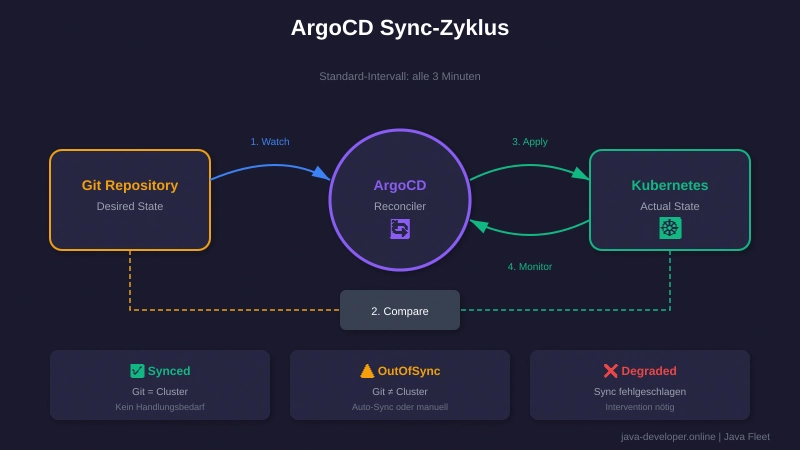
Abbildung 2: So funktioniert der kontinuierliche Sync-Zyklus in ArgoCD
Was ist Drift?
Drift = Unterschied zwischen Git (gewünschter State) und Cluster (tatsächlicher State).
ArgoCD zeigt Drift automatisch:
# Drift anzeigen
argocd app diff my-java-app-prod
Beispiel-Output:
===== apps/Deployment my-java-app ======
--- live
+++ git
@@ -15,7 +15,7 @@
     spec:
       containers:
       - name: app
-        image: myregistry/my-java-app:hotfix-xyz  # Jemand hat manuell geändert
+        image: myregistry/my-java-app:v1.2.3      # Git sagt was anderes
Self-Healing in Action:
Mit selfHeal: true korrigiert ArgoCD das automatisch innerhalb von 3 Minuten (Standard-Sync-Interval).
Notification bei Drift (Slack-Integration):
apiVersion: v1
kind: ConfigMap
metadata:
  name: argocd-notifications-cm
  namespace: argocd
data:
  service.slack: |
    token: $slack-token
  template.app-out-of-sync: |
    message: |
      Application {{.app.metadata.name}} is out of sync!
      Sync Status: {{.app.status.sync.status}}
      Health: {{.app.status.health.status}}
  trigger.on-sync-status-unknown: |
    - when: app.status.sync.status == 'OutOfSync'
      send: [app-out-of-sync]
Multi-Environment Workflow
Der sichere Weg: Environment Promotion
┌─────────┐    PR     ┌─────────┐    PR     ┌─────────┐
│   dev   │ ───────► │ staging │ ───────► │  prod   │
└─────────┘  merge    └─────────┘  merge    └─────────┘
     │                     │                     │
     ▼                     ▼                     ▼
 dev-cluster         staging-cluster        prod-cluster
Workflow:
- Entwicklung: Änderungen in
overlays/dev/→ Auto-Sync - Testing: PR von dev → staging Branch → Review → Merge
- Production: PR von staging → main Branch → Review → Approval → Merge
Branch-Strategie für GitOps:
# Dev: Immer auf develop Branch
spec:
  source:
    targetRevision: develop

# Staging: Auf staging Branch
spec:
  source:
    targetRevision: staging

# Prod: Nur main/master, mit Tag
spec:
  source:
    targetRevision: v1.2.3  # Oder main mit commit SHA
Secrets in GitOps
Das Problem: Secrets in Git = Sicherheitsrisiko
Lösung 1: Sealed Secrets
# Sealed Secrets Controller installieren
kubectl apply -f https://github.com/bitnami-labs/sealed-secrets/releases/download/v0.24.0/controller.yaml

# Secret verschlüsseln
kubeseal --format yaml < secret.yaml > sealed-secret.yaml

# Sealed Secret in Git committen (sicher!)
git add sealed-secret.yaml
git commit -m "Add sealed secret"
Lösung 2: External Secrets Operator
apiVersion: external-secrets.io/v1beta1
kind: ExternalSecret
metadata:
  name: my-secret
spec:
  refreshInterval: 1h
  secretStoreRef:
    name: vault-backend
    kind: ClusterSecretStore
  target:
    name: my-secret
  data:
    - secretKey: password
      remoteRef:
        key: secret/data/myapp
        property: password
Code Sentinel’s Empfehlung:
„Sealed Secrets für den Anfang. External Secrets mit Vault für Enterprise. Niemals Plain-Text Secrets in Git – auch nicht in privaten Repos.“
🔗 Externe Links – Teil 10: GitOps & ArgoCD
Für Einsteiger 🌱
| Ressource | Beschreibung |
|---|---|
| ArgoCD Getting Started | Offizielle Schnellstart-Anleitung |
| Kustomize Tutorial | Interaktives Kustomize-Tutorial |
| GitOps Principles | Was ist GitOps? Der offizielle Standard |
Offizielle Dokumentation 📚
| Ressource | Beschreibung |
|---|---|
| ArgoCD Docs | Komplette ArgoCD-Referenz |
| ArgoCD Best Practices | Empfehlungen für Production |
| Flux CD Docs | Alternative zu ArgoCD |
| Kustomize Docs | Offizielle Kustomize-Dokumentation |
Tools & Repositories 🛠️
| Tool | Beschreibung |
|---|---|
| ArgoCD GitHub | Source Code & Issues |
| Kustomize GitHub | Kustomize Repository |
| Sealed Secrets | Secrets sicher in Git speichern |
| External Secrets Operator | Vault/AWS Secrets Manager Integration |
| kubeseal CLI | Installation & Verwendung |
Fortgeschritten 🌳
| Ressource | Beschreibung |
|---|---|
| ArgoCD ApplicationSets | Multi-Cluster GitOps |
| ArgoCD Notifications | Slack/Teams Integration |
| Argo Rollouts | Progressive Delivery mit ArgoCD |
✅ Checkpoint
Hast du heute gelernt:
- [ ] Was GitOps ist und warum es wichtig ist?
- [ ] Wie ArgoCD installiert und konfiguriert wird?
- [ ] Wie du Applications mit Kustomize strukturierst?
- [ ] Wie Drift Detection funktioniert?
- [ ] Wie du Secrets sicher in GitOps handhabst?
Quick-Test:
- Was macht
selfHeal: truein ArgoCD? - Warum sollte Production ein festes Image-Tag haben?
- Wie rollst du eine fehlerhafte Änderung zurück?
🎨 Challenge für diese Woche
Deine Mission:
- Installiere ArgoCD in deinem Cluster (oder Minikube)
- Erstelle ein GitOps-Repository mit der empfohlenen Struktur
- Deploye eine einfache Java-App (oder das AutoTech-Projekt aus Teil 9)
- Teste Drift Detection: Ändere etwas per kubectl und beobachte ArgoCD
Bonus: Richte Slack-Notifications für Sync-Failures ein.
❓ FAQ
Frage 1: ArgoCD oder Flux – was soll ich nehmen?
Beide sind solide. ArgoCD hat die bessere UI und ist einsteigerfreundlicher. Flux ist leichtgewichtiger und besser für Multi-Tenancy. Für die meisten Teams: ArgoCD.
Frage 2: Muss ich Kustomize verwenden?
Nein. ArgoCD unterstützt auch Helm, plain YAML und Jsonnet. Kustomize ist aber der sauberste Ansatz für Environment-Overlays ohne Template-Komplexität.
Frage 3: Was wenn ArgoCD selbst ausfällt?
Dein Cluster läuft weiter – ArgoCD ist nur für Sync zuständig. Bei Ausfall: Kein Auto-Sync, kein Self-Heal. Nach Recovery synct ArgoCD automatisch nach.
Frage 4: Wie oft synct ArgoCD?
Standard: Alle 3 Minuten. Konfigurierbar in der ArgoCD ConfigMap. Für kritische Apps: Webhook-Trigger bei Git Push.
Frage 5: Kann ich ArgoCD auch für Helm Charts nutzen?
Ja, nativ unterstützt. Du kannst Helm Charts direkt referenzieren oder Helm-generierte Manifests in Git committen (empfohlen für Audit-Trail).
Frage 6: Wie verhindere ich, dass jemand kubectl benutzt?
RBAC einschränken. Entwickler bekommen nur Read-Access auf Cluster. Alle Änderungen gehen durch Git. ArgoCD macht den Rest.
Frage 7: Was macht ihr bei Java Fleet, wenn jemand trotzdem kubectl benutzt?
lacht Das gehört eher zu private logs. Aber sagen wir mal so: Kofi hat einmal „nur kurz was gefixed“ und ArgoCD hat es 3 Minuten später zurückgesetzt. Die Slack-Notification kam schneller als sein „Done!“-Post. Seitdem respektiert er den Prozess. 🔒
📖 CI/CD-Mastery Serie – Alle Teile
| Teil | Thema | Status |
|---|---|---|
| 1 | Erste Pipeline | ✅ |
| 2 | Security Gates (OWASP & Trivy) | ✅ |
| 3 | Coverage Gates (JaCoCo) | ✅ |
| 4 | Quality Gates (SonarQube) | ✅ |
| 5 | Multi-Stage Docker Builds | ✅ |
| 6 | Container Security (SBOM) | ✅ |
| 7 | Registry Integration | ✅ |
| 8 | Blue-Green Deployments | ✅ |
| 9 | Canary & Kubernetes | ✅ |
| → 10 | GitOps & Environments | 📍 Du bist hier |
| 11 | Jenkins Enterprise | 📅 Nächste Woche |
| 12 | Multi-Platform & Finale | 📅 Coming Soon |
📦 Downloads
| Ressource | Beschreibung |
|---|---|
| gitops-starter-kit.zip | Repository-Struktur, ArgoCD Configs, Beispiel-App |
| argocd-setup.sh | Installation Script für lokales Testing |
| kustomize-cheatsheet.pdf | Schnellreferenz für Overlays |
Quick Start:
# 1. ZIP entpacken
unzip gitops-starter-kit.zip
cd gitops-starter-kit

# 2. ArgoCD installieren (Minikube vorausgesetzt)
./argocd-setup.sh

# 3. Beispiel-App deployen
kubectl apply -f argocd/example-app.yaml
🔮 Nächste Woche: Jenkins Enterprise
Teil 11: Jenkins für große Teams – Shared Libraries & Distributed Builds
Du lernst:
- Shared Libraries schreiben (DRY für Pipelines)
- Pipeline-Templates für 100+ Projekte
- Configuration as Code
- Jenkins skalieren
Warum Jenkins nach GitHub Actions?
Viele Enterprises haben Jenkins-Infrastruktur. Shared Libraries sind das Feature, das Jenkins für große Teams unverzichtbar macht.
👋 Bis nächste Woche!
GitOps ist ein Mindset-Shift. Am Anfang fühlt es sich langsamer an – jede Änderung durch Git, Reviews, PRs.
Aber nach dem ersten Incident, den du in 30 Sekunden per git revert gelöst hast, wirst du es nicht mehr missen wollen.
Fragen? Schreib mir: code.sentinel@java-developer.online
Keep deploying, keep learning! 🛡️
Bernd’s Corner:
„GitOps? In meiner Zeit haben wir FTP benutzt und gehofft, dass es klappt. Heute beschweren sich Leute, dass ein PR 5 Minuten dauert. Weißt du, wie lange ein FTP-Upload über ISDN gedauert hat? Ich auch nicht mehr. Ich hab’s verdrängt.“
— Bernd, der sich weigert, seine kubectl-Aliase aufzugeben
Tags: #GitOps #ArgoCD #Kubernetes #DevOps #CI/CD
© 2025 Java Fleet Systems Consulting | java-developer.online
